4.6 Configure PaperStream Scan Source
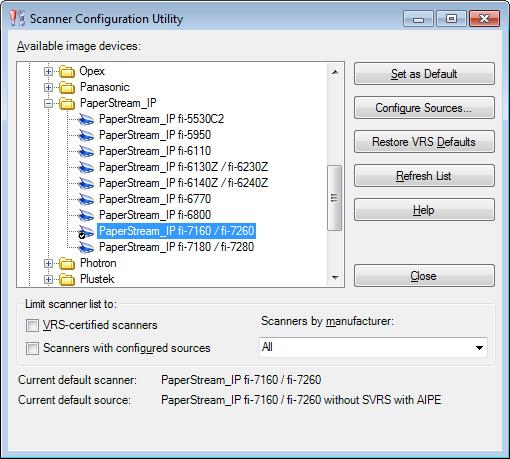
- Go to Control Panel and select KSM-32.
- De-select ‘VRS-certified scanners’ and ‘Scanners with configured sources’. Be certain that under ‘Scanners by manufacturer’ ‘All’ is selected.
- Click on ‘Refresh List’.
- Search the refreshed list for ‘PaperStream_IP’.
- Within the PaperStream group select your model of scanner.
- Click on ‘Set as Default’.
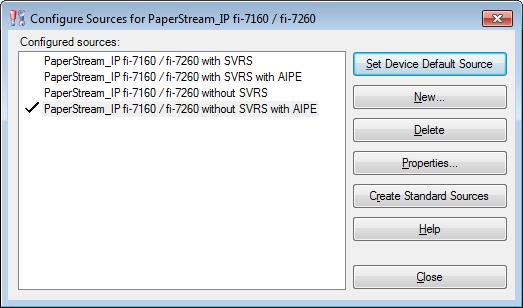
- Click on ‘Configure Sources…’.
- Select ‘PaperStream (your model) without SVRS with AIPE’.
- Click on ‘Set Device Default Source’.
- Click on ‘Close’ in the ‘Configure Sources’ dialogue box.
- Click on ‘Close’ in the ‘Scanner Configuration Utility’ dialogue box.
This page last updated in Release Number: 15-01
Release Date: 01/16/15
Effective Date: 01/16/15