|
|
Electronic Case File Handbook Release 18-01 March 28, 2018 |

|
|
Electronic Case File Handbook Release 18-01 March 28, 2018 |
The following issues/problems have been found with the ECF scanning project.
|
|
Issue/Problem
|
Resolution |
|
1
|
Kofax stops working when the computer name is changed by IT staff. |
Do not change the computer name unless absolutely necessary. If you must rename the computer, Ascent Capture must be reinstalled and a new software license must be granted by the state.
|
|
2 |
At the scan station PC, you receive an example of an error message:
The date on the license server has been rolled backwards. You must either obtain a special activation code to address this situation or set the date back to the original date. (11/11/2011 1/11/2011 0)
This error is usually causes by an operator messing with the Windows system date. This action will corrupt the software scanning license. |
Click on Contact Us link below. With the assistance of a DHS staff person, follow these instructions:
Follow the instructions steps to repair the software installation. If any errors are encountered during the software repair process notify DHS staff of the issue. Notify DHS staff when the software repair process has completed successfully.
|
|
3 |
There is a problem with some applications that were ACCESS Tracking Numbers, then RFAs, and then merged with an open CARES Case. In this situation, the documents can’t be searched by using the CARES Case Number. |
Until this issue is resolved, you must search under ACCESS Tracking Number). |
|
4 |
Error message "AcLicImp: Invalid volume dates." appears in the RSA. |
See 3.8 Troubleshooting AcLicImp: Invalid volume dates error. |
|
5
|
I re-imaged the scan PC from a backup copy and now the scanner doesn't work. |
Re-imaging a PC with Kofax on it can cause date and timestamp related errors with the Kofax license. Please click Contact Us for DHS to troubleshoot the problem. |
| 6 |
I'm having problems viewing or manipulating documents in the CWW viewer, such as a grayed out document, documents loading slowly, difficulty reading the text on documents, or others. |
Problems with the CWW Document Viewer are addressed in a Troubleshooting section of the Process Help 45.9. |
| 7 |
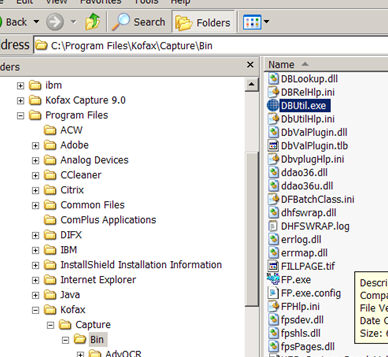
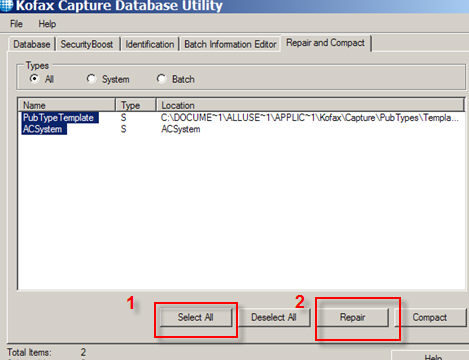
I'm getting an error that my database is corrupt on the scan PC. |
Run the Database Repair Utility on the scan PC. You may lose any unprocessed batches.
 |
|
|
|
This page last updated in Release Number: 13-02
Release Date: 11/14/13
Effective Date: 11/14/13