ECF Capture
| Related Topics: | Workflows

|
| | How do I?
|
I | Screens
|
| | Reference
|
| | Technical
|
|
ECF Capture
| Related Topics: | Workflows
|
| | How do I?
|
I | Screens
|
| | Reference
|
| | Technical
|
|
| Do not adjust any image settings |
| All scanned and imported images must be in black and white at 300 dpi. |
The standard scan settings should only changed to import a file instead of scanning, or to scan from the flat bed instead of the Automatic Document Feeder (ADF)
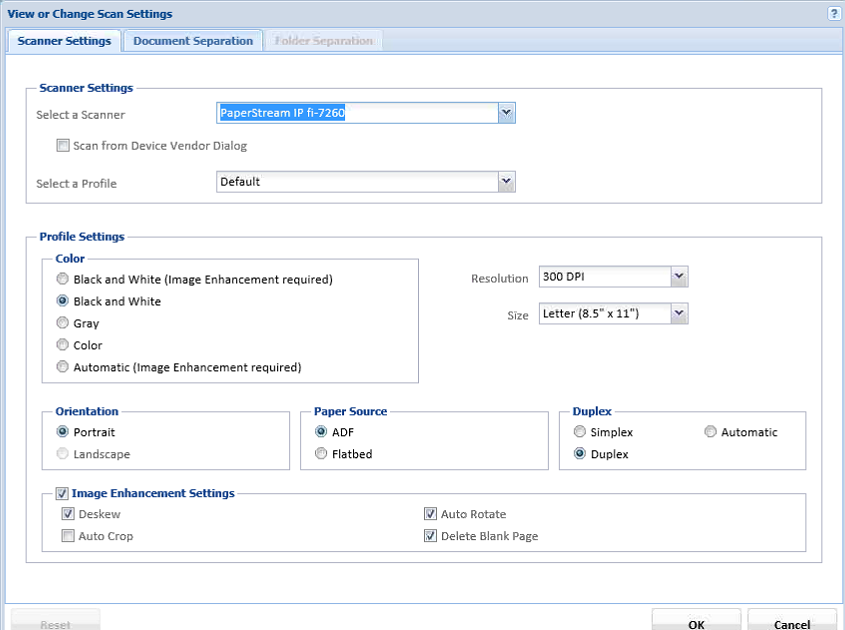
| Field | Default Setting | Reason to Change |
| Select a Scanner | The name of the scanner attached to the scan station | Change only if you need to import a document from your computer, or if a new scanner is installed. |
| Select a Profile | Default | Never change this setting. |
| Color | Black and White | Never change this setting.
Changing this setting to gray or color will lead to large file sizes that will slow down systems. |
| Resolution | 300 DPI | Never change this setting.
Changing this setting to higher DPI will lead to large file sizes that will slow down systems. Changing this setting to lower DPI will cause images to become unreadable. |
| Size | Letter | Never change this setting. |
| Orientation | Portrait | Never change this setting. Rotation occurs during Document Review. |
| Paper Source | ADF | Change only if you need to scan a document from the scanner
flatbed.
Be sure to change the setting back to ADF when you are done scanning on the flatbed. |
| Duplex | Duplex | Never change this setting. |
| Image Enhancement Settings | Deskew
Auto Rotate Delete Blank Page |
Never change this setting. |